Community Fishers State of the Ocean Climate Profiles
This data product presents the vertical profile of an ocean climate parameter (e.g., temperature, salinity, etc.) as a function of depth. It captures how the parameter's depth-dependence changes over time by summarizing data collected across multiple years for a given month. The product is designed to support long-term oceanographic research and climate trend analysis.
Formats
The data product is distributed in the following formats:
- PNG Plot (Oceans 3.0 API filter:
extension=png) - A visual representation of the parameter vs depth. - CSV Table (Oceans 3.0 API filter:
extension=csv) - A tabular summary of the data. - MAT File (Oceans 3.0 API filter:
extension=mat) - A MATLAB-compatible file containing structured arrays with the data.
All formats are based on the same data which includes:
- Metadata
Depth bins
All individual casts (aligned and depth-binned)
Monthly averages (per year)
Overall average and standard deviation
Note:
The amount of metadata varies slightly from format to format. PNG plots have the least amount of it presented in their header and comment. CSV tables have it in the table header. MAT files have raw metadata as a separate structured array.
Individual casts may be not presented in PNG plots according to data quality requirements.
Data Collection Methodology
- Sensor Deployment: Data is collected using a profiling device that is lowered into the ocean, recording values of the climate parameter as it descends (data can also be collected with an ascending device).
- Temporal Resolution: Multiple casts can be potentially conducted throughout the target month each year. However, some years may have no casts in the target month.
Data Processing Workflow
Individual Casts: Each cast (sensor deployment) yields a profile of the climate parameter vs depth. These casts are aligned and depth-binned. Recorded measurements are averaged into 1-meter depth bins, each centered at 1-meter intervals (e.g., 0.5–1.5 m centered at 1 m).
Monthly Averages: For each year, all casts from a given month are averaged to produce a single depth profile representing that month.
Overall Average: Monthly profiles from all available years are averaged together to form a multi-year average for that month. Standard deviation at each depth bin is also calculated.
Data Quality Requirements:
- Individual casts are presented in PNG plots when there are not more than 30 casts in total for the plot.
- Monthly averages are calculated only for those depth bins which have at least 70% from the total number casts in the month within the year.
- Example: Within a month, there are ten individual casts recorded from the ocean surface to the following depths in meters: 1, 2, 3, 4, 5, 6, 7, 8, 9, 10. The monthly average for this month extends only to 4m. Because from 5m and down we have less then 70% of casts. E.g. for 5m: (# of casts that extend to this depth in this month)/(total number of casts in the month) = 6/10 = 60%. With this, the number of casts in other years doesn't affect the calculations for this month.
- Overall average and standard deviation are calculated only for those depth bins which have at least 70% of the total number of monthly averages.
- Example: There are ten years of casts. Calculated monthly averages go to the following depths in meters: 1, 2, 3, 4, 5, 6, 7, 8, 9, 10. The overall average and standard deviation extends only to 4m.
- Calculation of standard deviation values requires three years of samples. If there are fewer than three years worth of sampling then the standard deviation values are not calculated.
Data Interpretation
- Monthly averages: Smooth out daily variability to represent typical conditions for a given month and year.
- Overall average and standard deviation: Highlight long-term climatological trend and variability in the ocean parameter.
Examples
The following data product examples were generated with the same data.
PNG Plot
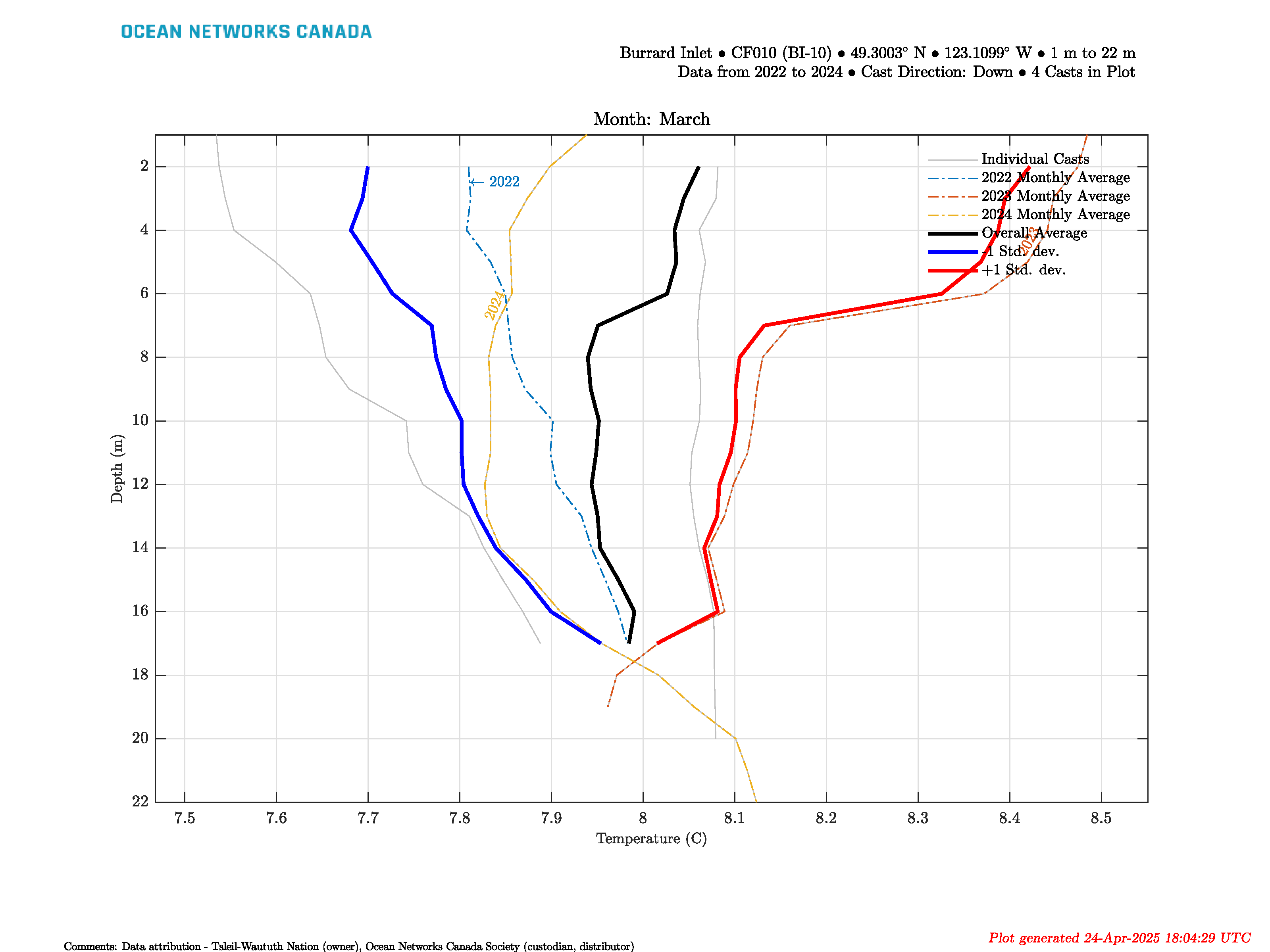
Text within the plot
The first title string: "Burrard Inlet • CF010 (BI-10) • 49.3003° N • 123.1099° W • 1 m to 22 m"
- Burrard Inlet: the name of the area where the station is located.
- CF010 (BI-10): the station where the casts were taken.
- 49.3003° N: the approximate latitude centre of the station. The approximate latitude of the center point is found by averaging the latitude for all points that comprise the polygon describing the station.
- 123.1099° W: the approximate longitude centre of the station. The approximate longitude of the center point is found by averaging the longitude for all points that comprise the polygon describing the station.
- 1 m to 22 m: the minimum to maximum depth of all casts within the plot.
The second title string: "Data from 2022 to 2024 • Cast Direction: Down Casts • 4 Casts in Plot"
- Data from 2022 to 2024: the year of the first cast to the year of the last cast.
- Cast Direction: Down Casts: the direction of the casts within the plot indicating whether the cast data were collected by a descending or ascending device.
- 4 Casts in Plot: the number of casts within the plot.
The comment in the footer of the plot: "Data attribution - Tsleil-Waututh Nation (owner), Ocean Networks Canada Society (custodian, distributor)"
- Data attribution: the roles of companies and communities regarding the data used for the plot.
CSV Table
Origin Section
- SOURCE: Citation author.
- HTTP: Citation publication site.
- HOME: Citation publication location.
- FLDATE: Creation date of the file.
- CITATION: DOI citation text as it appears on the Dataset Landing Page. If the file contains data from multiple datasets, additional lines are included in CITATION.
- DATAATTRIBUTION: Companies and communities with their roles regarding the data used for the data product.
- SEARCHID: DMAS search ID from Oceans3.0.
Location Section
- STNNAME: Station name.
- STNCODE: Station code.
- LATITUDE: Latitude north.
- LONGITUDE: Longitude east.
- DEPTH: Depth range of casts (m).
Device Section
- DEVCAT: Device category.
- DEPLDATE: Device deployment date.
- DEVNAME: Full device name.
- DEVCODE: Device code.
- DEVID: Device ID.
Data Section
- DATEFROM: First timestamp (using ISO8601 format) contained within the data.
- DATETO: Last timestamp (using ISO8601 format) contained within the data.
- SAMPMIN: Minimum percent of valid data per calculated statistical value.
- TOTSAMPLE: Total number of data samples in the casts.
- DPCOMMENT: Data product comment regarding the calculations of statistical values.
- QAQCCOMMENT: Quality assurance comment with the meanings of QAQC flags.
Column Section
- SENSORID: Sensor ID.
- CASTTIME: Timestamp when the casts started (month and year for monthly averages).
- SENSORNAME: Column name (same as the sensor name for individual casts)
- SENSORUNIT: Units of measurement for the data in the column.
MAT File
Data: Structure array with data of individual casts.
- sensorID: Unique identifier number for each sensor.
sensorName: Name of sensor.
sensorCode: Unique string for the sensor.
sensorDescription: Description of sensor.
sensorType: Type of sensor as classified in the ONC data model.
sensorTypeID: ONC ID given to sensor type.
units: Unit of measure for the sensor data.
isEngineeringSensor: Boolean (flag) to determine if sensor is an engineering sensor.
sensorDerivation: String describing the source of the sensor data: derived from calibration formula (dmas-derived), calculated on the device (instrument-derived), calculated by an external process (externally-derived), or direct from the instrument.
- propertyCode: Unique string for the sensor that is used in the Oceans 3.0 API.
isMobilePositionSensor: Boolean (flag) to determine if sensor is a mobile sensor. Note, this will only be flagged true if this data was added in addition to the requested data. For example, if the user requests a device-level mat product from a GPS device, then the latitude sensor is not flagged. Conversely, if the user requests temperature data from a mobile platform like a ship, then the latitude data from the GPS is added and interpolated to match the time stamps of the temperature sensor. See Positioning and Attitude for Mobile Devices for more information.
deviceID: Unique identifier number for the parent device.
- searchDateNumFrom: Start of the time interval queried with the search in MATLAB datenum format.
- searchDateNumTo: End of the time interval queried with the search in MATLAB datenum format.
- dataProductOptions: String describing the data product options selected for this data product. This information is reflected in the file name.
- qaqcFlagDescription: Quality assurance comment with the meanings of QAQC flags.
- dat: Cast data.
- qaqcFlags: Flags indicating the quality of the cast data.
- dataDateNumFrom: Start (first time-stamp) of the cast in MATLAB datenum format.
- dataDateNumTo: End (last time-stamp) of the cast in MATLAB datenum format.
DataClimate: Structure array with calculated statistical data based on the individual casts.
- sensorID: Unique identifier number for sensors contributed with casts to the calculation of statistical data (can be multiple for searches that combine data from multiple deployments).
sensorName: Name of sensor.
sensorCode: Unique string for the sensor.
sensorDescription: Description of sensor.
sensorType: Type of sensor as classified in the ONC data model.
sensorTypeID: ONC ID given to sensor type.
units: Unit of measure for the calculated data.
isEngineeringSensor: Boolean (flag) to determine if sensor is an engineering sensor.
sensorDerivation: String describing the source of the sensor data: derived from calibration formula (dmas-derived), calculated on the device (instrument-derived), calculated by an external process (externally-derived), or direct from the instrument.
- propertyCode: Unique string for the sensor that is used in the Oceans 3.0 API.
isMobilePositionSensor: Boolean (flag) to determine if sensor is a mobile sensor. Note, this will only be flagged true if this data was added in addition to the requested data. For example, if the user requests a device-level mat product from a GPS device, then the latitude sensor is not flagged. Conversely, if the user requests temperature data from a mobile platform like a ship, then the latitude data from the GPS is added and interpolated to match the time stamps of the temperature sensor. See Positioning and Attitude for Mobile Devices for more information.
deviceID: Unique identifier number for the parent device.
- searchDateNumFrom: Start of the time interval queried with the search in MATLAB datenum format.
- searchDateNumTo: End of the time interval queried with the search in MATLAB datenum format.
- dataProductComment: Data product comment regarding the calculations of statistical values.
- qaqcFlagDescription: Quality assurance comment with the meanings of QAQC flags.
- dat: Monthly averages for different years.
- qaqcFlags: Flags indicating the quality of the monthly averages data.
- count: Number of casts contributed to the monthly average value in a depth bin.
- overallAvg: Overall average values.
- qaqcFlagsAvg: Flags indicating the quality of the overall average data.
- countAvg: Number of monthly averages contributed to the overall average value in a depth bin.
- overallMinusStdDev: Overall average with subtracted standard deviation.
- overallPlusStdDev: Overall average with added standard deviation.
- qaqcFlagsStdDev: Flags indicating the quality of the standard deviation data.
- countStdDev: Number of monthly averages contributed to the standard deviation value in a depth bin.
- dataDateNumFrom: First time-stamp in all individual casts in MATLAB datenum format.
- dataDateNumTo: Last time-stamp in all individual casts in MATLAB datenum format.
Metadata: Structure array with metadata
- creationDate: Date and time (using ISO8601 format) that the data product was produced. This is a valuable indicator for comparing to other revisions of the same data product.
- deviceDetails: Structure array with a structure for each deployment, with the following fields:
- deviceDeploymentDateFrom
- deviceDeploymentDateTo
- deviceID: Unique identifier to represent the instrument within the ONC observatory.
- deviceName: Name given to the instrument.
- deviceCategory: Unique name given to the category of devices, such as 'CTD'
- deviceCategoryCode: Code representing the device category. Used for accessing webservices, as described here: API / webservice documentation (log in to see this link).
- deviceCode: Unique string for the instrument which is used to generate instrument search data product file names.
- location: Structure array with a structure for each deployment location, with the following fields:
- stationName: Secondary location name.
- stationCode: Code representing the station. Used for accessing webservices, as described here: API / webservice documentation (log in to see this link).
- depth_metres: Obtained at time of deployment. If NaN, the device is mobile and this position is a variable, the data for which is supplied by a sensor in the data struct.
- lat_degrees: Obtained at time of deployment. If NaN, the device is mobile and this position is a variable, the data for which is supplied by a sensor in the data struct.
- lon_degrees: Obtained at time of deployment. If NaN, the device is mobile and this position is a variable, the data for which is supplied by a sensor in the data struct.
- heading_degrees: Obtained at time of deployment. If NaN, the device is mobile and this position is a variable, the data for which is supplied by a sensor in the data struct.
- pitch_degrees: Obtained at time of deployment. If NaN, the device is mobile and this position is a variable, the data for which is supplied by a sensor in the data struct.
- roll_degrees: Obtained at time of deployment. If NaN, the device is mobile and this position is a variable, the data for which is supplied by a sensor in the data struct.
- dataQualityComments: In some cases, there are particular quality-related issues that are mentioned here. This is distinct from QAQC information contained in the data structure.
- Attribution: Structure array with information on any contributors, ordered by importance and date. If an organization has more than one role it will be collated. If there are gaps in the date ranges, they are filled in with the default Ocean Networks Canada attribution (seen in example below). If the "Citation Required?" field is set to "No" on the Network Console then the citation will not appear. Here are the fields:
- acknowledgement: Usually formatted as "<organizationName> (<organizationRole>)", except for when there are no attributions and the default is used (as shown above). This text is used to attribute plots when there are contributors other than ONC.
- startDate: in MATLAB datenum format.
- endDate: in MATLAB datenum format.
- organizationName
- organizationRole: Comma separated list of roles
- roleComment: Primarily for internal use, usually used to reference relevant parts of the data agreement (may not appear)
- citation: Char array containing the DOI citation text as it appears on the Dataset Landing Page. The citation text is formatted as follows: <Author(s) in alphabetical order>. <Publication Year>. <Title, consisting of Location Name (from searchTreeNodeName or siteName in ONC database) Deployed <Deployment Date (sitedevicedatefrom in ONC database)>. <Repository>. <Persistent Identifier, which is either a DOI URL or the queryPID (search_dtlid in ONC database)>. Accessed Date <query creation date (search.datecreated in ONC database)>
- totalScalarSamplesReceived: Number of time stamps that have any valid data on any sensor (at each time stamp). Only defined for metaData(1).totalScalarSamplesReceived, as this total is a summary of all device deployments in the data product.