The Oceans 3.0 API provides programmatic access to the over 500 terabytes of data collected since 2006, from thousands of sensors, through a collection of web services. This Guide describes how to use the Ocean 3.0 API to write scripts in any language that supports HTTP requests, or use our sample code or one of our client libraries to shortcut the development process.
General Overview
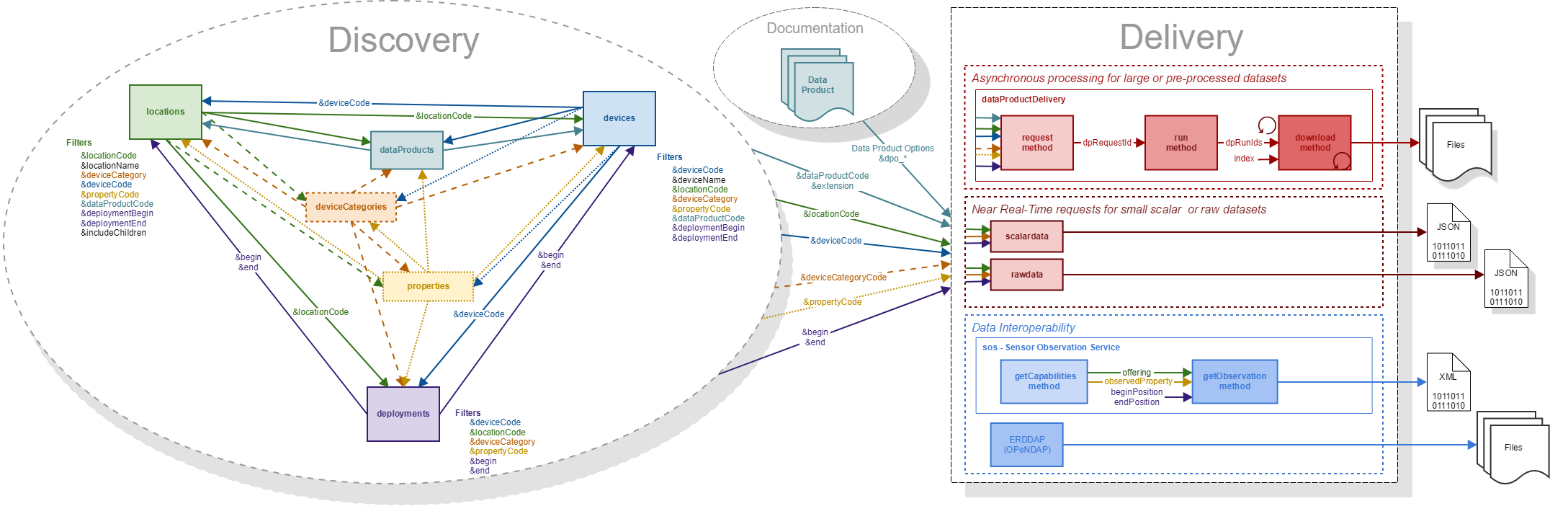
The Oceans 3.0 API provides a collection of web services for programmatically unlocking access to the vast ONC data archive, whether it is scalar data, complex data or video and imagery. The services in the API are split into three functional groups: 1) Discovery, 2) Delivery and 3) Interoperability.
b) The synchronous approach is currently being handled by the scalardata and rawdata services. The objective of these services is to provide fast access to small amounts of simple data, such as the last reading from an instrument and return it immediately in the response payload in json format, so that it can be quickly utilized by the calling program.
See for more information here: Oceans 3.0 API Home
API tutorial
Client Libraries
Client libraries provide quick, easy and consistent access to Oceans 3.0 API, in popular scientific programming languages.
These libraries provide a class with methods that wrap web service calls, complex workflows, and business logic so that users can discover and download data (raw, text, image, audio, video or any other available) in a single line of code.
They are all free projects, published under Open Source licenses:
| Language | Latest library version | Repository | License | Code Repository | documentation | examples | |
|---|---|---|---|---|---|---|---|
| Python | 2.4.1 (24/09/2024) | PyPI | Apache 2 | python-client (github) | API python client documentation | Python Code examples |
| MATLAB |
| File Exchange | BSD 2 | matlab-client (github) | Matlab File Exchange | Matlab Code examples |
| R |
| Github | MIT | r-client (no longer maintained) | N/A | N/A |



If this is your first time using these client libraries, we suggest you visit the Installation and Getting started pages.
The latest library version works with the current version of Oceans 3.0 Web API.
New versions are created to resolve known client library issues, add new functionality or handle changes to the underlying Web Services.
Please report all issues with the web services, documentation, samples and client libraries by going to Oceans 3.0 Data Portal and clicking Request Support button available for each application.