Community Fishers Station Profile Animation
This dataproduct is not yet released and this documentation is in progress.
This dataproduct is used for displaying a time series contour plot and a profile plot of casts within one image. A profile is a series of measurements made throughout the water column grouped by each pass through the water, known as a 'cast', as opposed to continuous time series data. Profiles of the water column can be created by performing casts with instruments. Casts involve lowering an instrument down into the water and back up again while it is making measurements. Cast detection or delineation is performed automatically with manual oversight, contact us for further details. The measurements from the various sensors attached to and within the instrument are processed to filter, smooth, align, and average data into depth bins. Information about the data processing applied is included in the comment of the data product. Specifically, the default processing steps are:
- The alignment of oxygen to account for instrument response lags. This is instrument-dependent.
- Chlorophyll is filtered using a 25 median point filter.
- Temperature and conductivity data is smoothed using a 5 point running mean.
- Practical salinity, sound speed, and density are calculated using smoothed temperature, smoothed conductivity, and pressure.
- Data is averaged into 1 m bins centred at 1 m intervals. Data is only averaged into its corresponding bin if 70% of the data within the bounds of the bin has a QAQC flag of 1.
The descending portion of the cast is then extracted.
Notes about this dataproducts operation
- This dataproduct operates on a per sensor basis and is thus available on aligned and depth binned Community Fisher sensors. When using default processing options: SEE PROCESSING OPTIONS BELOW pre computed aligned and depth binned data is used when generating the dataproduct. If custom processing options are chosen then data will be aligned and depth binned on the fly, note that this is much more computationally expensive and thus takes longer to generate a product.
- This dataproduct only operates on casts that have been assigned to a station. Unassigned casts are not included in this product.
- When this dataproduct is used in an "Instruments by Category" search all station-assigned casts for the instrument within the search range are grouped into their respective station and the product operates on the groupings.
- This dataproduct requires at least two casts per station to operate.
- This data product selects the best cast per day. Best is defined as the cast with the greatest number of non NaN samples, generally, this is the deepest cast.
Oceans 3.0 API filter: dataProductCode=CFSPA
Formats
This dataproduct is available in the following formats:
Oceans 3.0 API filter: extension=mp4
Oceans 3.0 API filter: extension=gif
Oceans 3.0 API filter: extension=png
Oceans 3.0 API filter: extension=pdf
The png format will return each frame that would have been used in making a gif or mp4. The pdf format does the same in pdf format and also joins the pdf images into one pdf file.
Explanation for each component of the DataProduct
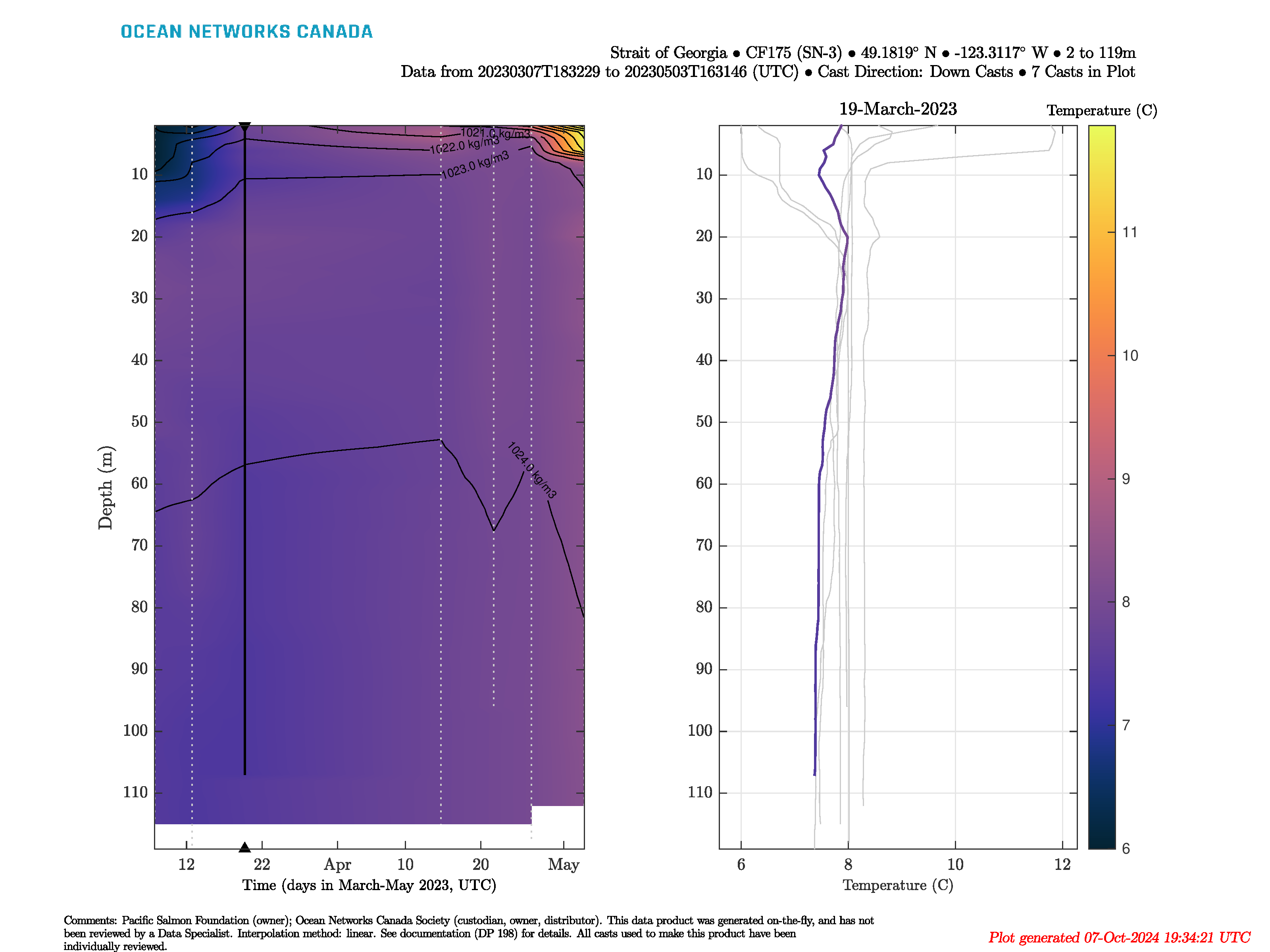
This data product is comprised of 2 side-by-side plots; a contour plot and a profile plot. An example frame from a GIF has been added below, this section explains what each component is and gives some details about how they are created.
Contour plot
The time series contour (left side plot) is created by linearly interpolating each depth binned sample across time. Grey dotted lines are then plotted vertically for the average time of each cast. Casts that are greater than six weeks apart are not interpolated between. Each frame will have a cast highlighted, that corresponds to the cast being displayed in the profile plot on the right. This is done with a vertical black line at the average time of the cast along with a black triangle along the time axis. If the dataproduct option to plot density contours is selected then selected density contour lines are plotted on top of the contour plot.
Profile plot
The profile plot (right side plot) is created by plotting the selected sensor vs depth for all casts within a desired time range. Then each frame has a cast highlighted by plotting the sensor vs depth using the same colourmap of the contour plot, along with titling the plot with the day that the cast occurred.
Text within the plot
The first title string: "Strait of Georgia • CF357 (SFN-17) • 49.2348° N • -123.679° W • 2 to 25m"
- Strait of Georgia: is the parent of the station CF357 (SFN-17)
- CF357 (SFN-17): the station where the casts were taken
- 49.2348° N: is the approximate latitude centre of the CF357 (SFN-17) station. The approximate latitude of the center point is found by averaging the latitude for all points that comprise the polygon describing station CF357 (SFN-17)
- -123.679° W: is the approximate longitude centre of the CF357 (SFN-17) station. The approximate longitude of the center point is found by averaging the longitude for all points that comprise the polygon describing station CF357 (SFN-17)
- 2 to 25m: the minimum to maximum depth of all casts within the plot
The second title string: "Data from 20230217T171936 to 20230327T185313 (UTC) • Cast Direction: Down Casts • 2 Casts in Plot"
- Data from 20230217T171936 to 20230327T185313 (UTC): is the timestamp of the first sample from the first cast to the timestamp of the last sample from the last cast.
- Cast Direction: Down Casts: is the direction of the casts within the plot
- 2 Casts in Plot: is the number of casts within the plot
The comment in the footer of the plot: "This data product was generated on-the-fly, and has not been reviewed by a Data specialist. All casts used to make this product have been individually reviewed."
- This data product was generated on-the-fly, and has not been reviewed by a Data specialist: is a disclaimer that no human has reviewed this particular date range and options set and thus the contour plot may contain interpolation artifacts
- All casts used to make this product have been individually reviewed:
An example frame of a gif:
Data Product Options


